
If you want to access your Techson cameras remotely without getting tangled up in port-forwarding headaches, we recommend a fast and reliable solution. Or is the situation even worse, with no public endpoint IP address at the site? No problem — I’ll show you what you can do!
The port forwarding capacity of network devices is limited. You can’t open an unlimited number of ports — and you really shouldn’t. Every additional open port is essentially an invitation saying: “Feel free to try breaking into my system here, since the other options didn’t work.”
Another common challenge is the long-standing exhaustion of IPv4 addresses. Public endpoint IPs are either unavailable or extremely limited. While this may eliminate the port forwarding issue, it introduces a new one: without a manufacturer-provided cloud service, your cameras may appear completely unreachable from the outside.
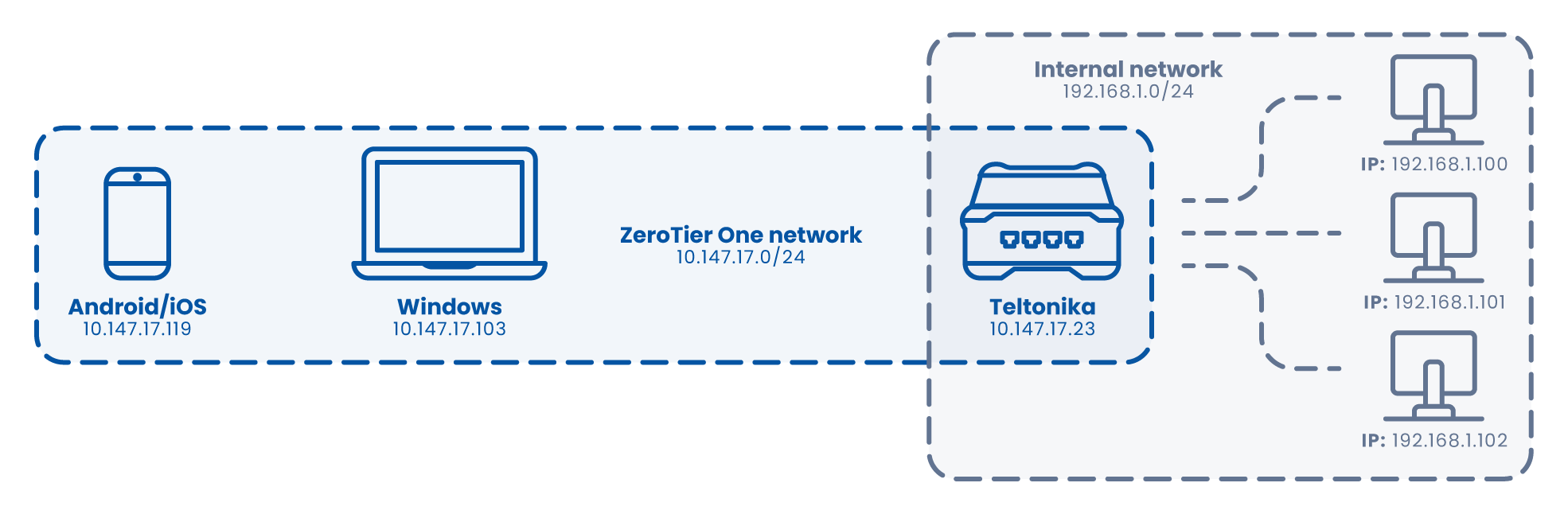
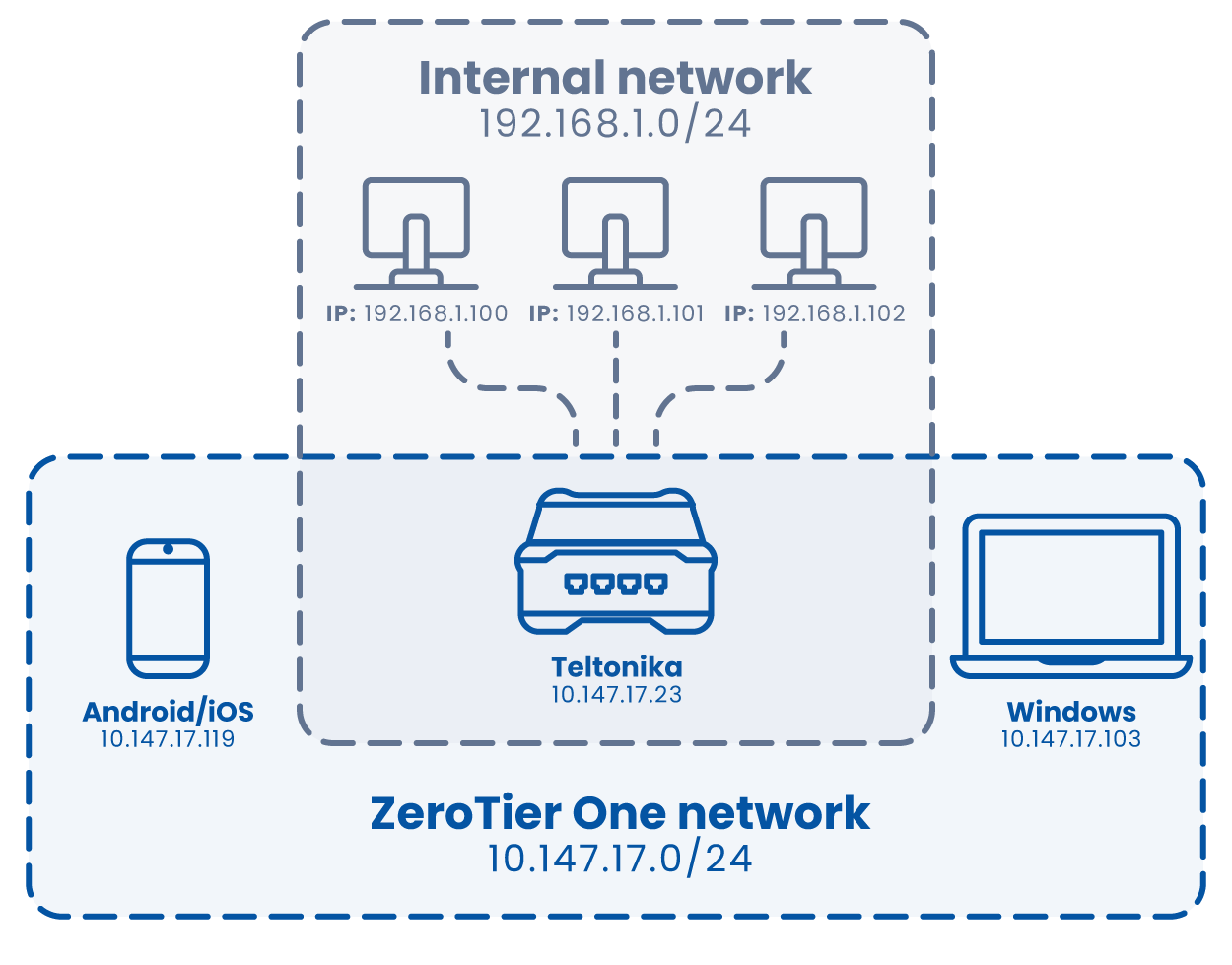
ZeroTier creates a software-defined virtual network layer (SD-WAN / peer-to-peer) between devices — effectively building a private network over the public internet. From a technical perspective, it behaves similarly to a VPN: encryption and authentication are present, but the connection model is different. Devices and networks are linked using unique identifiers, rather than traditional tunnel endpoints.
For Teltonika routers running RutOS (RUT / RUTX series), ZeroTier is available as a native package. In this setup, the router itself becomes the secure entry point to the camera network. This approach is especially effective for Techson CCTV systems: the cameras remain safely inside the local network, while remote access is provided via ZeroTier virtual IP addresses — with no port forwarding required.
No port forwarding: Camera services remain completely hidden from the public internet.
Works behind CGNAT: ZeroTier supports NAT traversal, making it suitable for ISP, mobile, and residential networks.
Centralized, managed routing: Using Teltonika and ZeroTier together, you can define managed routes that allow remote devices to access the camera LAN in a controlled manner.
Change default Teltonika credentials and keep firmware up to date.
Approve only required nodes in the ZeroTier network; use ACLs and two-factor authentication where appropriate.
Secure camera admin interfaces with HTTPS and strong passwords; disable default admin accounts if possible.
Avoid leaving the entire system in full bridge mode unless absolutely necessary.
Yes, ZeroTier can operate in bridge mode. However, this requires additional attention during configuration.
From a security standpoint, bridging allows everyone to see and communicate with everyone. From a performance perspective, it can generate unnecessary broadcast traffic.
In short: You want one driver — not a hacker driving the bus. Someone who takes you where you want to go, not someone who takes everything with them.
For Techson cameras and intercom systems, network discovery may be required. In such cases, bridge mode can be a valid solution — even allowing mobile applications to function correctly, provided the phone is also connected to the same ZeroTier network.
That said, routing with managed routes and firewall rules offers far greater control in most scenarios.
The Teltonika + ZeroTier combination even allows bridge and routed networks to coexist, as long as they are separated across different interfaces.
Monitor bandwidth usage: Video streams generate significant traffic. For monitoring-only access, reduce camera bitrates for remote viewing.
Use VLANs on Teltonika devices to isolate camera traffic.
Test access both from the local network and from an external ZeroTier node — routing behavior can vary depending on router model and firmware version.
ZeroTier + Teltonika is one of the cleanest and most elegant solutions for remote access to Techson CCTV systems. It keeps cameras hidden from the open internet while providing a private, controlled “tunnel” for secure access.
 Change default Teltonika credentials and keep firmware up to date.
  IMPORTANT! Always design your network so the driver is well-trained and trustworthy